Using Boost
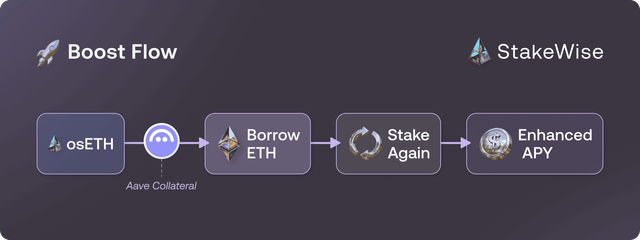
Boost is a yield amplification strategy available on Ethereum. It uses your osETH as collateral on Aave to borrow additional ETH, which is then staked back into the Vault on your behalf. This looping process repeats automatically, amplifying your staking position with a single click — no manual DeFi steps required.
How far the loop goes depends on the Vault's osETH LTV: roughly 6x in a 90% LTV Vault and up to 14x in a Vault with near-100% LTV. Over the mid-term, Boost historically delivers a total APY of approximately 4–6%.
 Prerequisites
Boost is available on Ethereum only, and starts from 0.05 ETH.
You can either boost osETH you already hold, or go straight from ETH to a boosted position in one transaction by picking Receive and boost osETH on the Stake page.
How to Boost
Via the Stake page
- Open app.stakewise.io ↗ and connect your wallet.
- Select the Boost tab.
- Check the Boost APY displayed to decide if it's a good time to enter.
- Enter the amount of osETH you want to boost.
- Review the details and confirm the transaction in your wallet.
Via a Vault page
- Head to the Vault page.
- Check the Boost APY displayed in the Vault to decide if it's a good time to enter.
- Click the plus (+) button to start the boost process.
- Enter the amount of osETH to boost in the input field.
- Review details and confirm the transaction in your wallet.
 Monitor Your Position
Periodically check on your position to ensure the Boost APY is positive. If you see a negative Boost APY for longer than 7 days in a row, consider unboosting your position. Stay informed for real-time updates via the StakeWise Discord ↗.
The Vault page also shows a borrow status for the position — Healthy up to 93.8% LTV, Moderate up to 94.5%, and Risky above that. See Boost safety for what those thresholds mean.
 Wallet Warning About an EOA
When boosting, your wallet may warn you that you are transacting with an externally owned account. This is expected — it is the deterministically calculated address of your own Boost position contract, which does not exist on-chain until the first transaction.
How to Unboost
Via the Stake page
- Open app.stakewise.io ↗ and connect your wallet.
- Select the Unboost tab.
- Enter the percentage of the position you want to exit.
- Confirm the transaction. Your request enters the unboost queue, where processing time depends on the network exit queue. Only one unboost request can be active at a time, and it must be claimed before you can boost or unboost again.
- Once processing is complete, click the Claim button to receive your assets. Claim as soon as they become claimable — leaving a completed request unclaimed incurs penalties.
Via a Vault page
- Head to the Vault page.
- Click the minus (–) button to start the unboost process.
- Enter the percentage of the position you want to exit.
- Confirm the transaction. Your request enters the unboost queue, where processing time depends on the network exit queue. Only one unboost request can be active at a time, and it must be claimed before you can boost or unboost again.
- Once processing is complete, click the Claim button on the Vault page. Claim as soon as assets become claimable — leaving a completed request unclaimed incurs penalties.
 Get a Claim Alert
You can set up an email or browser notification to be alerted as soon as your unboosted position is ready to be claimed. Click your wallet address in the top-right corner, then click the alert button  next to your address. In the Configure alerts pop-up, enter your email and click Save, or enable browser notifications.